Why do we need architecture?
Imagine you build a small app by placing all the code in a single Activity. At first it will seem to work fine, but when you want to add new features or fix a bug, everything becomes chaotic. We don't know where everything is, and changing something breaks things.
Architecture helps us organize ourselves. Think about a house, for example: there is a place for the kitchen, another for sleeping, another for working, etc. Each space has a single purpose, making it easier to find things.
This architecture divides our project into layers, specifically into three layers.
UI Layer
This layer is what users see and interact with: a button, an input, etc. This is where ViewModels and concepts such as Compose, Fragments, and Activities come into play.
Its responsibility is to display the current status of the data and respond to user requests.
ViewModel
What is a ViewModel?
A ViewModel is a class that contains and manages the data to be displayed on the screen. Exposes the state to the user interface (UI) and encapsulates the business logic. This data is stored in the cache, so it does not need to be retrieved every time you switch Activities.
Let's look at an example of how to create a ViewModel:
class TaskViewModel(
    private val getTasksUseCase: GetTasksUseCase
) : ViewModel() {
    val tasks: StateFlow<List<Task>> = getTasksUseCase()
        .stateIn(viewModelScope, SharingStarted.Lazily, emptyList())
}
The ViewModel is used in the following way in a Composable:
@Composable
fun TaskScreen(viewModel: TaskViewModel) {
    val tasks by viewModel.tasks.collectAsState()

    LazyColumn {
        items(tasks) { task -> Text(task.title) }
    }
}
Domain Layer
This is an optional layer, but highly recommended. It contains the business rules: what your app does, not how it displays it. Here, it doesn't matter how the data is displayed or where it comes from.
class GetTasksUseCase(private val repository: TaskRepository) {
    operator fun invoke(): Flow<List<Task>> = repository.getAllTasks()
}
It is like a "bridge" between the UI and the data.
Data Layer
This is where the data flows and is divided into two parts:
Repositories
The UI or domain does not access the data directly; it must access it through repositories, which coordinate the data sources, which may be local, remote, cache, etc. The repositories decide where to obtain the information.
class TaskRepository(
    private val localDataSource: TaskDao,
    private val remoteDataSource: TaskApi
) {
    fun getAllTasks(): Flow<List<Task>> = localDataSource.getAll()
}
Data Sources
On the other hand, there are Data Sources, which are the actual sources of data, such as a local database (Room), an API, files, etc.
@Dao
interface TaskDao {
    @Query("SELECT * FROM tasks")
    fun getAll(): Flow<List<Task>>
}
Data Flow
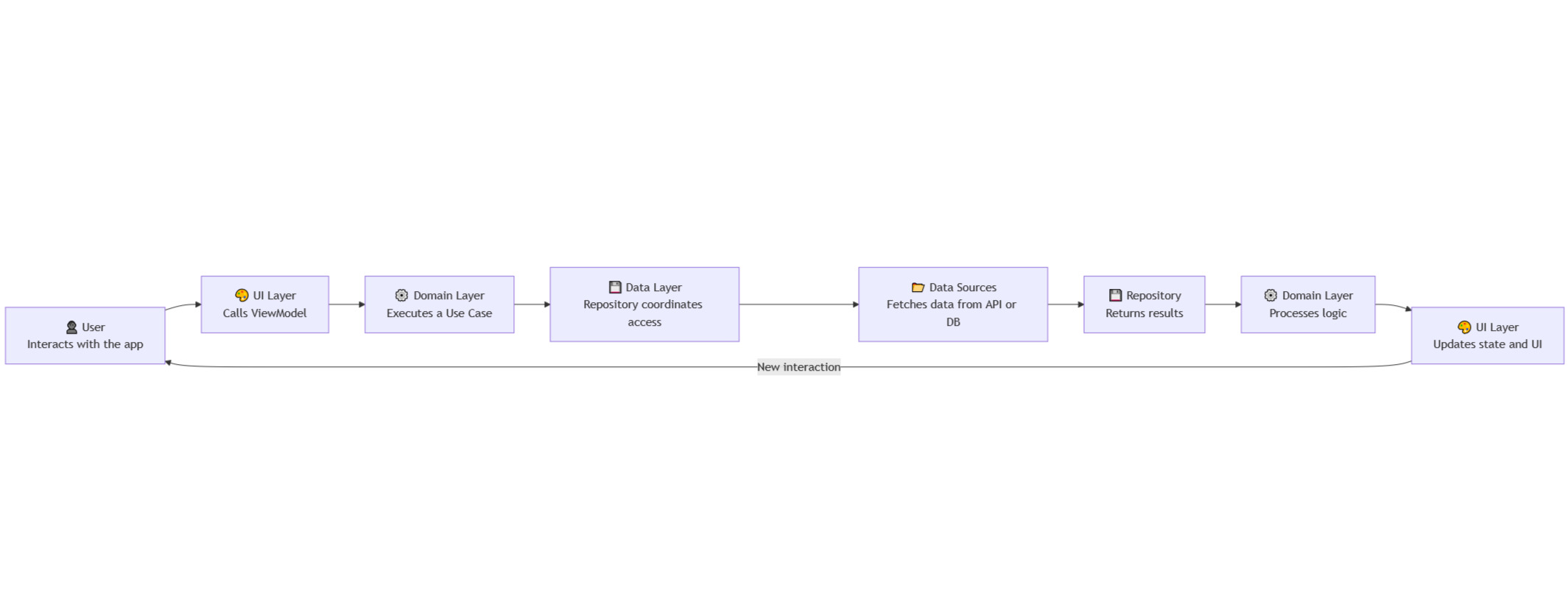
Android app data flow with Koltin
Benefits you get with this architecture
- Separate responsibilities
- The code becomes easier to maintain and test in the future.
- Easier to scale without breaking things
- Facilitates unit testing by separating business logic from the UI
- Reduces coupling between components