Git vs. GitHub
Git and GitHub are two different things. Git manages file versions, while GitHub is a cloud platform that hosts Git repositories, making it easier for developers to collaborate in teams. GitHub is often described as the "social network" for programmers.
Key Concepts
Git tracks your files using "snapshots" that record how the files in your repository look at a given moment. Think of it as a logbook for every file. We decide when to take a snapshot and of which files; this action is known as a "commit." A repository (a project) is made up of a collection of commits. All repository information can be duplicated on each user's system or kept on a central server like GitHub.
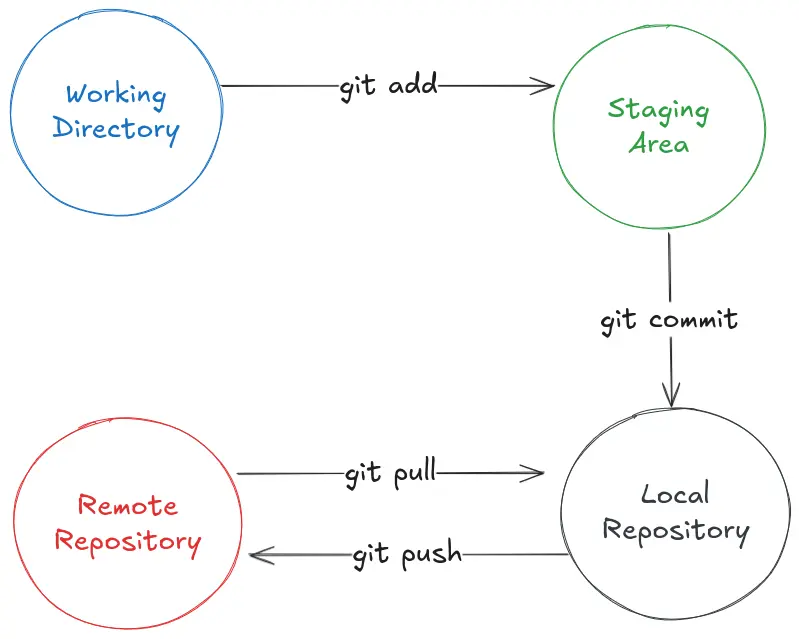
Changes are made in the Working Directory, prepared with git add in the Staging Area, confirmed with git commit in the Local Repository, and then synchronized with the Remote Repository using git push to upload and git pull to bring down updates.
Branches
Branches in Git are parallel versions of a code repository that allow developers to work on different features, bug fixes, or experiments independently without affecting the main code.
A Git Flow is used to branch our repositories, helping us work efficiently and stay organized.
Advantages of Git Flow:
- Clear branch organization.
- Facilitates team collaboration.
- Allows precise control over software versions.
Among the most common branches used are:
main: The primary branch that always contains production-ready code.devordevelopment: The branch for active development. Features are integrated here before launching a new version.hotfix/: Used to resolve critical production errors. They are created frommainand, once the problem is fixed, merged back into bothmainanddev.feature/: Branches used to work on new functionalities. They are created fromdevand, once completed, integrated back intodev.
Workflow Example
- Start in
dev. - Create a
feature/new-functionalitybranch for a specific task. - Once the feature is finished, merge it into
dev. - Perform tests and adjustments on that branch.
- Once everything is correct, the release is merged into
main. - If an urgent bug is detected afterward, a
hotfixis created frommain, fixed, and merged into bothmainanddev.
The workflow might seem complex at first, but with practice, it becomes a daily routine. It is ideal for teams and projects that need to maintain order and control over versions, bugs, and new features. You should definitely use it.