10 tips to get the most out of OpenCode
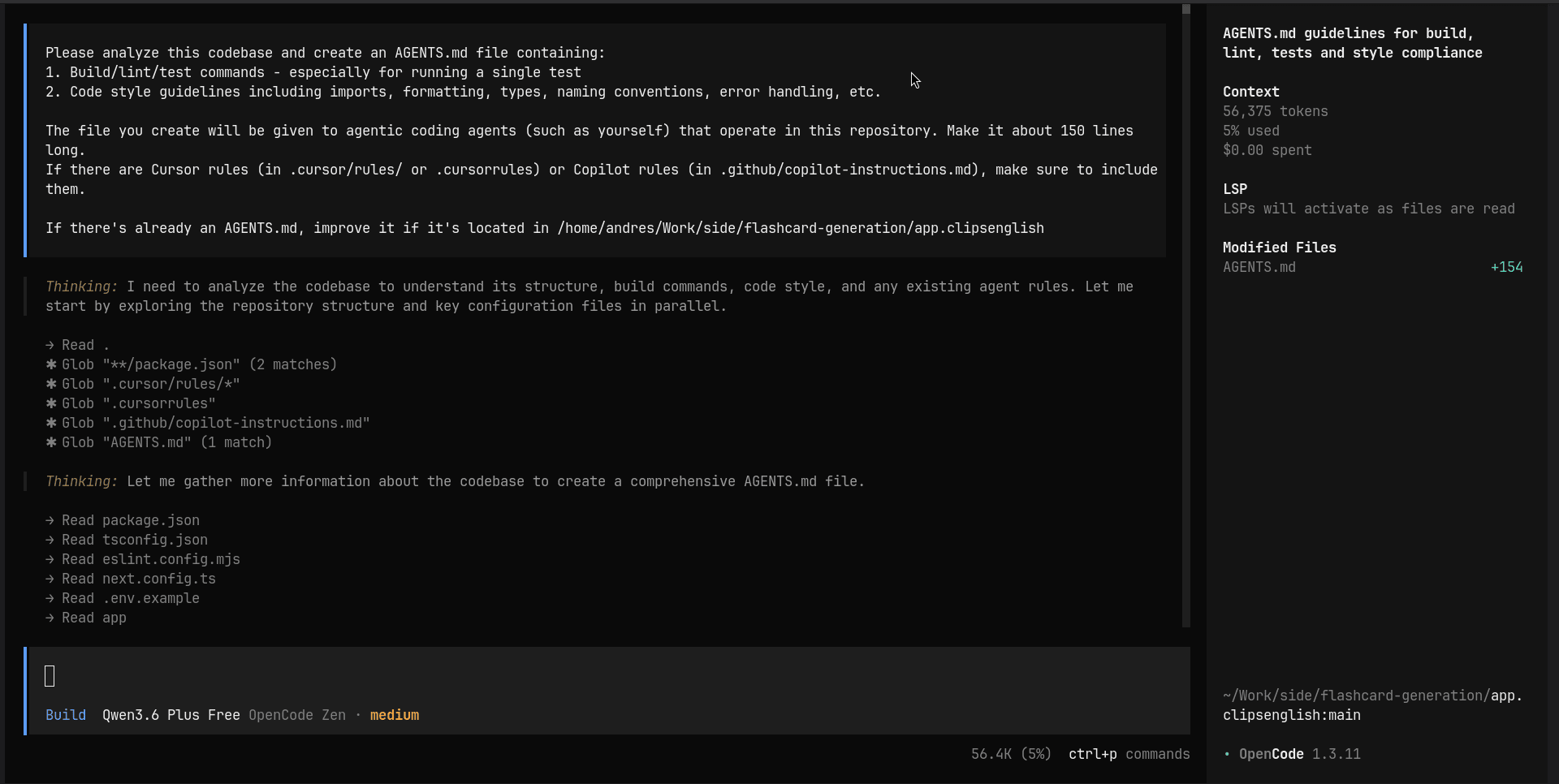
1. Initialize your project with /init
Before writing a single line of code, run /init at the root of your project. OpenCode will analyze your repository and generate a base context file that the model will use in every session. This is the starting point that prevents you from having to explain your project from scratch in every conversation.
This command will create an AGENTS.md file with the project context:
2. Use undo and redo without fear
OpenCode tracks the changes the model makes to your files. If you're not satisfied with a change, undo reverts the last action, and redo restores it. This gives you the freedom to experiment without the fear of permanently breaking something.
3. Mention files with @ for precision
When you reference a file using @FileName, the model knows exactly where to look for relevant context instead of scanning the entire project. This significantly reduces token consumption and makes responses much more accurate.
# Example
Refactor the authentication logic in @src/features/auth/hooks/useAuth.ts
Use it whenever possible. It is one of the habits that has the biggest impact on response quality.
4. Switch models based on the task
Not all models cost the same in tokens, and not every task requires the most powerful model. A good rule of thumb:
- Fast/Economic Model: exploration, simple questions, minor refactors.
- Powerful Model: architecture, complex logic, deep debugging.
Switching models at the right time allows you to do more within the same token budget.
You can visit artificialanalysis.ai to compare model performance.
5. Master plan and build
OpenCode has two operating modes that work in sequence:
plan: the model analyzes the problem and proposes a strategy before touching any code. Use it for complex or high-risk tasks.build: the model directly executes the changes.
The ideal combination is using plan to validate the approach and then build to execute. Jumping straight to build for complex tasks is likely to produce suboptimal results.
6. Activate the Prompt Improver before coding
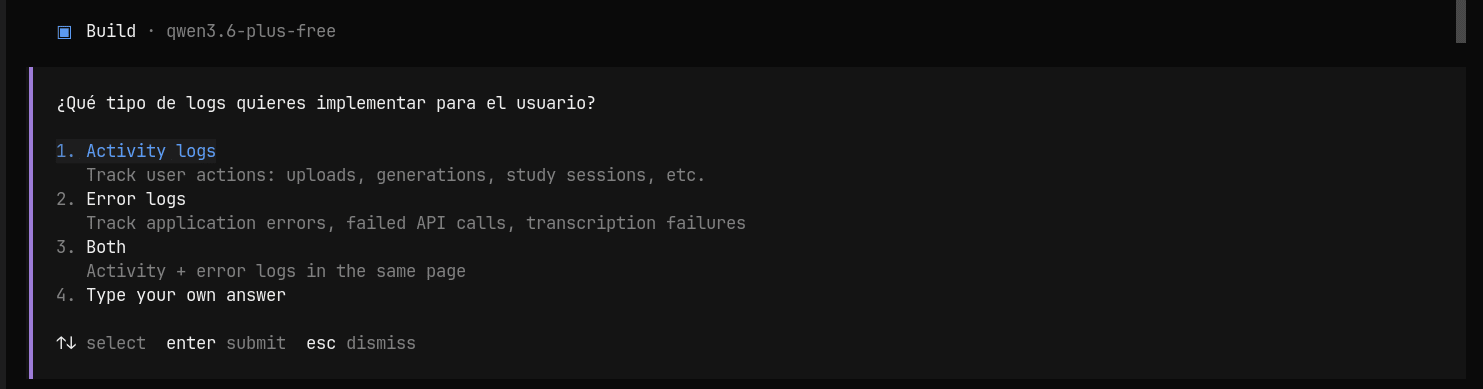
The Prompt Improver is a feature that asks clarifying questions before executing a task. Instead of assuming what you want, the model gathers the necessary information to act with precision. This saves you several correction cycles.
You can use the skill skills.sh/github/awesome-copilot/boost-prompt to enhance this process.
7. Create commands for repetitive tasks
If you find yourself writing the same type of instruction over and over, it’s a sign you need a custom command. OpenCode allows you to define them to standardize frequent tasks such as:
- Generating tests for a module.
- Creating a new feature following the project structure.
- Reviewing a file for code smells.
Commands turn a repetitive instruction into a single action.
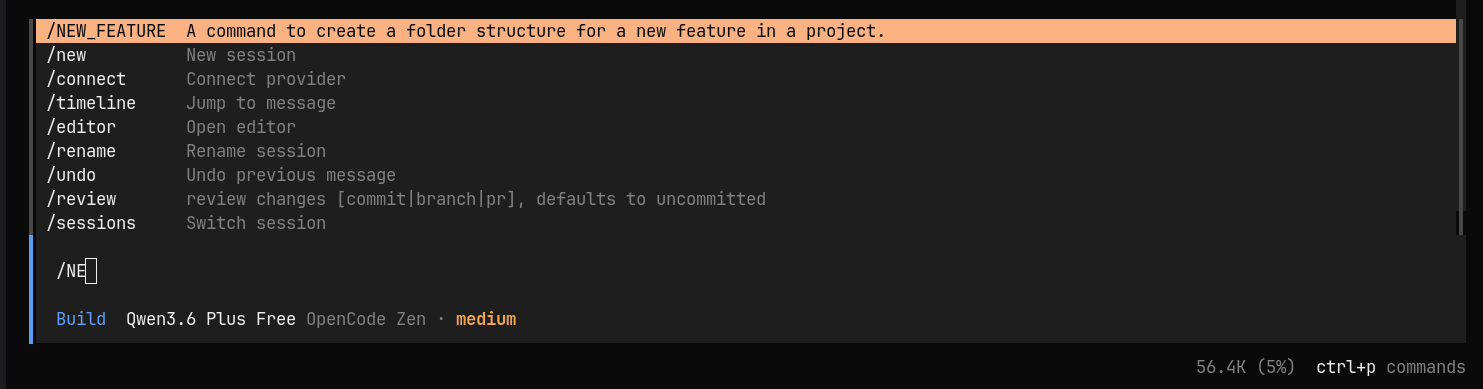
To configure them, create a folder named commands inside .opencode and add a Markdown file with the name of your command (e.g., .opencode/commands/NEW-FEATURE.md). It must follow this structure:
---
description: Command description
agent: plan or build
---

Instruction content
Detailed example for a service:
---
description: A command to create a folder structure for a new feature in a project.
agent: build
---

Create a new service for the entity $1.
Follow the Hexagonal Architecture pattern:
1. Create the Input Port (Interface) in `domain/ports/in`.
2. Create the Service Implementation in `domain/services`.
3. Use Spring Boot annotations and ensure the code is compatible with Java 17.
4. If $2 is provided, use it as the primary repository interface.

Check the existing folder structure in `src/main/java` before generating.
To run it, type / and OpenCode will suggest your custom commands:
8. Leverage skills
Skills are snippets of specialized context that the model can load on demand. Before creating one from scratch, run find-skills to see what is already available. Someone might have already built exactly what you need.
You can visit skills.sh, where there are many ready-to-use skills.
9. Create your own skills
This is the feature that makes the most difference in the long run. You can create project-specific skills in .opencode/skills/ or .agents/skills/ to provide compatibility for more agents. Each skill is a Markdown file with structured context that the model loads when needed.
Basic Structure:
.opencode/skills/
└── structure/
    └── SKILL.md
A well-written skill defines the stack, the folder architecture, and your project's code standards. For example, a skill for a React project using Feature-Sliced Design might look like this:
---
name: structure
description: Project-specific context: stack, architecture, and conventions.
---

## Stack
- React (Functional Components, Hooks)
- TypeScript (Strict Mode)
- Tailwind CSS + shadcn/ui
- TanStack Query

## Folder Architecture

- `src/components/` → Generic and reusable components (domain-agnostic).
- `src/features/<feature>/` → Domain-based modules. Each contains:
  - `/components`, `/hooks`, `/services`, `/types`, `/store` (optional).
- `src/services/` → Global API configuration (Axios, interceptors).
- `src/hooks/` → App-wide reusable hooks (`useAuth`, `useDebounce`).
- `src/lib/` → Utilities, helpers, and third-party configurations.
- `src/types/` → Global interfaces shared between features.

## Code Standards

- **Dumb components:** Logic goes in hooks, not in `.tsx` components.
- **Data fetching:** Services only handle fetching. Async state goes in hooks with TanStack Query.
- **TypeScript:** Using `any` is forbidden. Define explicit interfaces for props, API responses, and payloads.
- **Styling:** Use `cn()` (clsx + tailwind-merge) to compose dynamic classes.
- **Naming Conventions:**
  - Components: `PascalCase` → `UserProfile.tsx`
  - Hooks/Utilities: `camelCase` → `useUserFetch.ts`
  - Prefer named exports over `export default`.
With a skill like this, the model already knows how your project is organized, what the stack is, and what the rules are. You never have to repeat it again.
10. Take advantage of continuous sessions
OpenCode maintains context throughout a session. This means you can build on top of what has already been done without re-explaining the project state in every message. Use this to your advantage: instead of opening a new session for every task, chain related tasks together. The model remembers previous decisions and applies them consistently.
You can use /session to list active sessions.
Frequently asked questions
How do you reduce token usage and get more accurate responses in OpenCode?
Run /init at the start to generate an AGENTS.md context file, then reference specific files with @FileName instead of letting the model scan the whole project, this cuts token consumption and sharpens accuracy.
When should you use plan mode vs build mode in OpenCode?
Use plan for complex or high-risk tasks so the model proposes a strategy before touching code, then switch to build to execute it. Jumping straight to build on complex tasks tends to produce worse results.
How do you create custom skills in OpenCode for project-specific AI coding?
Add a SKILL.md file inside .opencode/skills/ (or .agents/skills/) defining your stack, folder architecture, and code standards, so the model automatically follows your project's conventions without you re-explaining them every session.
Comments