Hide your header links from Google snippets with data-nosnippet
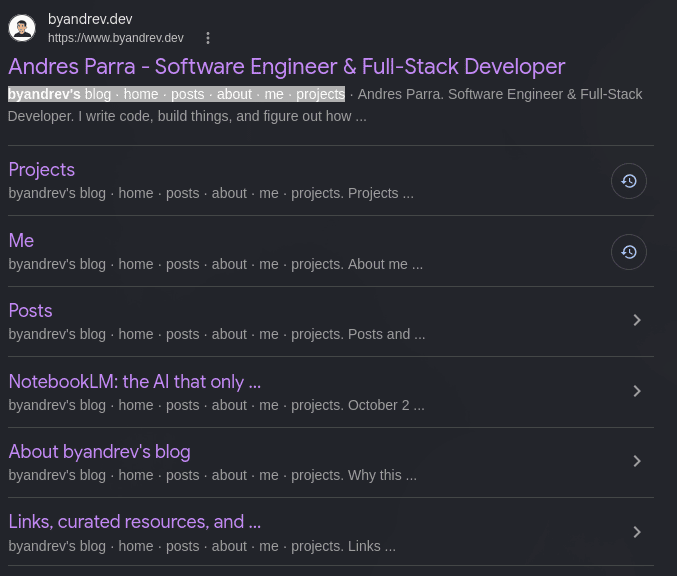
I searched for my own site and every result showed the same thing: my header links, pasted into the snippet. Not the post content. Just "Posts Me About" over and over.
The fix
Google has an official way to say "do not use this text in snippets": the data-nosnippet attribute.
<header>
  <div data-nosnippet>
    <a href="/">Home</a>
    <a href="/blog">Blog</a>
  </div>
</header>
That is it. No robots meta tag, no nofollow, no script.
The rule everybody misses
data-nosnippet only works on div, span and section.
If you put it on a <header>, a <p>, a <nav> or an <li>, Google ignores it. I made this mistake first. The attribute looked right in the HTML and did nothing.
So if your markup is semantic, you need an extra wrapper. Slightly ugly, but it works.
What it does not do
This is not noindex and not nofollow.
The text stays in the page. Google still crawls it and still follows the links. You are only telling Google: do not show this part as the description in search results.
That is the whole point. You keep your real SEO untouched and you only change what the user reads in the result.
When it is worth using
- Repeated navigation or footer text, like my case.
- Legal notices that look strange as a summary.
- Promo text like "subscribe now".
- Paywalled content where you do not want to give away the key paragraph for free.
Verifying it
The change is not instant. Google has to crawl the page again, so the old snippet can stay for a while.
You can force a re-crawl with the URL Inspection tool in Search Console and then wait. I would not judge the result the same day.
Bing supports it too, and it goes further
Since October 2025, Bing supports data-nosnippet as well. Same idea: the content stays indexed and still counts for ranking, it just does not show up in the preview.
Two differences worth knowing.
First, Bing applies it to any HTML element. The div / span / section limit is Google's rule, not the attribute's. So if you write <header data-nosnippet> it may work in Bing and still be ignored by Google. Use the wrapper anyway and you cover both.
Second, in Bing it also affects AI-generated answers and Copilot, not only the classic snippet. That is a bigger deal than the snippet itself if you care about what the AI layer quotes from your site.
DuckDuckGo does not document this attribute, but it does not run its own crawler at scale for snippets either. Most of its results and previews come from Bing. So my guess is that it inherits the behavior. I have not tested it, so treat that as a guess and not a fact.
Frequently asked questions
Does data-nosnippet work on any HTML element?
No. Google only supports it on div, span and section. On a header, nav, p or li the attribute is ignored.
Does data-nosnippet remove the page from Google?
No. The page stays indexed and the text stays crawlable. You only block that part of the text from being used as the snippet in search results.
What is the difference between data-nosnippet and noindex?
noindex removes the whole page from search results. data-nosnippet keeps the page and only hides a block of text from the description. They solve different problems.
Does data-nosnippet work in Bing?
Yes, since October 2025. In Bing it also applies to AI answers and Copilot, not only to the classic snippet.
Comments