SDKMAN - Java version management
What is SDKMAN?
SDKMAN is a version manager for Unix-based environments (Linux and macOS), and it can also be used on Windows with WSL. It allows you to easily install and switch between different versions of Java and other related tools in this ecosystem. It’s simple to use since it operates from the terminal, similar to how nvm works for Node.js users.
Installation
To install SDKMAN, you need to have the zip package installed to ensure the command works correctly.
curl -s "https://get.sdkman.io" | bashAfter installation, reload some configuration data:
source "$HOME/.sdkman/bin/sdkman-init.sh"How to Install a Java Version
To install a specific version of Java, run the following command:
sdk list javaThis will display a list of all available Java versions. Copy the Identifier of the version you want to install and then run:
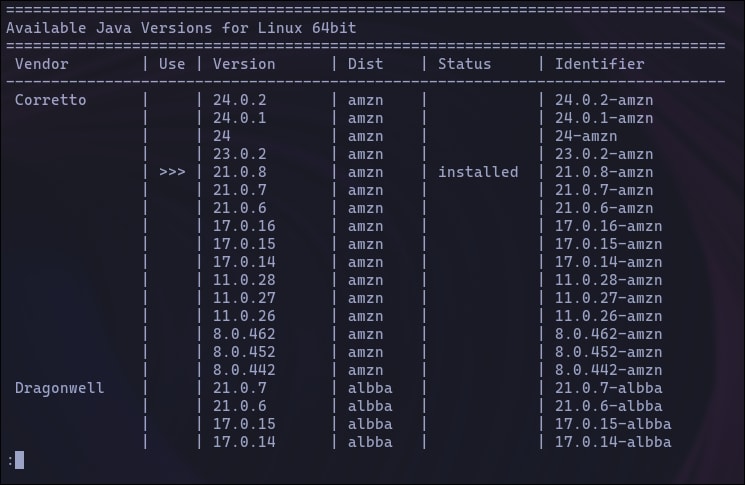
sdk install java identifierFor example:
sdk install java 17-temSwitching Between Java Versions
If you have multiple versions installed, you can easily switch between them:
sdk use java 11.0.20-temViewing Installed Versions
To see all installed Java versions, use this command:
sdk list javaFrequently asked questions
What is SDKMAN used for?
SDKMAN is a command-line tool for installing and switching between versions of Java and other JVM-related tools on Linux, macOS, or Windows with WSL.
Is SDKMAN similar to nvm?
Yes. It works like nvm does for Node.js, but for Java and other JVM tools.
How do I switch between installed Java versions?
Run sdk use java <version>, for example sdk use java 11.0.20-tem.
How do I see which Java versions I have installed?
Run sdk list java. Installed versions show up in that same list.
Comments