Twilio Integration with Spring Boot to Send Text Messages (SMS)
What is Twilio?
Twilio is a cloud-based platform that allows developers to integrate voice, messaging, video, and email features into applications via API. This example will let us send an SMS using Spring Boot.
Dependencies
First, we need to create our Spring Boot project, you can use Spring Initializr. Then install the following dependency:
In Gradle:
implementation group: "com.twilio.sdk", name: "twilio", version : "11.3.2"In Maven:
<dependency>
    <groupId>com.twilio.sdk</groupId>
    <artifactId>twilio</artifactId>
    <version>11.3.2</version>
    <scope>compile</scope>
</dependency>
Check out more info about the dependency here: https://mvnrepository.com/artifact/com.twilio.sdk/twilio/11.3.2
Generating a Twilio Token
To send messages we need to be authenticated with Twilio. To do that, we need to add the following variables to application.properties or application.yml:
twilio:
  account-sid: ${TWILIO_ACCOUNT_SID}
  auth-token: ${TWILIO_AUTH_TOKEN}
  phone-number: ${TWILIO_PHONE_NUMBER}
Where do you get this data and the token? You need to create a Twilio account, then go to the Console at https://console.twilio.com/ and look for Account Info, where you'll find the data we need.
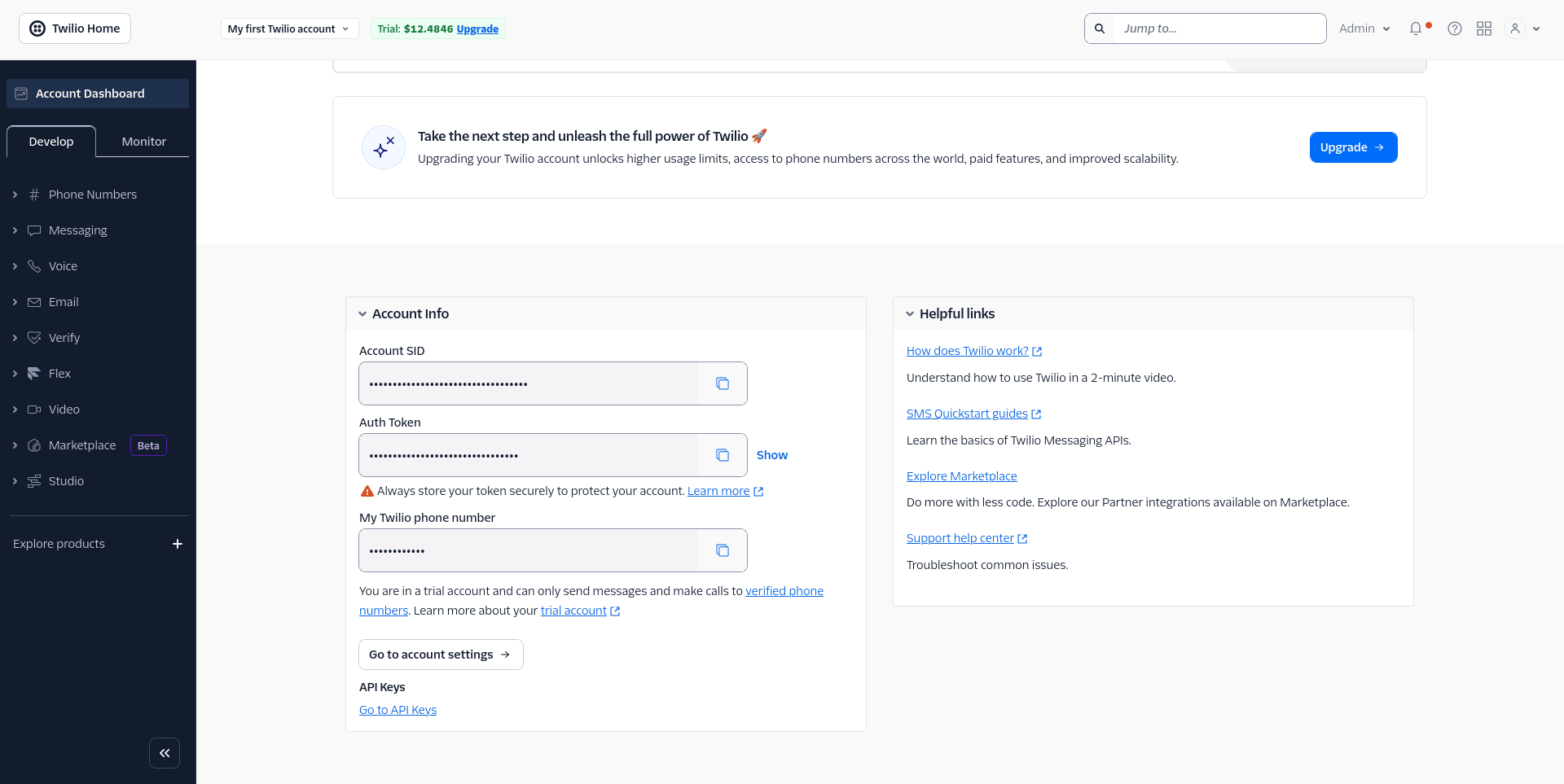
Twilio Client
Now let's create a class to send messages:
import com.twilio.Twilio;
import com.twilio.rest.api.v2010.account.Message;
import org.springframework.beans.factory.annotation.Value;
import org.springframework.stereotype.Component;
import com.twilio.type.PhoneNumber;

@Component
public class TwilioService {

    @Value("${twilio.account-sid}")
    private String accountSid;

    @Value("${twilio.auth-token}")
    private String authToken;

    @Value("${twilio.phone-number}")
    private String fromNumber;

    public TwilioService(
            @Value("${twilio.account-sid}") String accountSid,
            @Value("${twilio.auth-token}") String authToken
    ) {
        Twilio.init(accountSid, authToken);
    }

    public void send(String to, String messageBody) {
        try {
            Message.creator(
                    new PhoneNumber(to),
                    new PhoneNumber(fromNumber),
                    messageBody
            ).create();
        } catch (Exception e) {
            throw new RuntimeException("Error sending SMS with Twilio: " + e.getMessage());
        }
    }

}
You need to be clear about this:
@Component: Defines the class as a Spring Bean, allowing it to be injected into other parts of the app.@Value: Safely loads the credentials (SID, Token, Number) from the configuration file.Constructor: RunsTwilio.init(), authenticating the application with the service as soon as the object is created.
Sending Messages
First we need to receive the request body to know who the message is being sent to and what it will contain, so we'll use a DTO:
import lombok.Data;

@Data
public class MessageDto {

    private String to;

    private String message;

}@Data: A Lombok annotation that automatically generates at compile time: Getters and Setters, toString(), equals(), hashCode(), and the constructor.
Now, to test sending SMS messages, I'll create a controller with a POST method to send an SMS to a phone number.
import com.byandrev.sms.config.TwilioService;
import com.byandrev.sms.dto.MessageDto;
import lombok.RequiredArgsConstructor;
import org.springframework.http.HttpStatus;
import org.springframework.http.ResponseEntity;
import org.springframework.web.bind.annotation.PostMapping;
import org.springframework.web.bind.annotation.RequestBody;
import org.springframework.web.bind.annotation.RequestMapping;
import org.springframework.web.bind.annotation.RestController;

@RestController
@RequestMapping("/api/v1/messages")
@RequiredArgsConstructor
public class MessageController {

    private final TwilioService twilioService;

    @PostMapping("/")
    public ResponseEntity<Void> sendMessage(@RequestBody MessageDto data) {
        twilioService.send(data.getTo(), data.getMessage());
        return new ResponseEntity<>(HttpStatus.CREATED);
    }

}
To test it, we need to make a POST request to the /api/v1/messages route with the following body:
{
    "to": "X",
    "message": "Hello from Twilio"
}- The
tofield should contain a phone number with a country code prefix, for example +57XXXXXXXX.
GitHub repository with all the code: https://github.com/byandrev/twilio-spring-boot
Frequently asked questions
Do I need a paid Twilio account to send SMS messages?
No, you can start with a free Twilio trial account. It comes with trial credit and a temporary phone number, though trial accounts can only send messages to verified numbers. For production use, you'll need to upgrade to a paid account.
Can I use this Twilio integration to send SMS internationally?
Yes, Twilio supports sending SMS to many countries. Just make sure to include the correct country code prefix in the to field (e.g., +57 for Colombia, +1 for the US), and verify that SMS is supported and enabled for that destination in your Twilio account.
What's the difference between the Account SID and the Auth Token in Twilio?
The Account SID is a unique identifier for your Twilio account, similar to a username, while the Auth Token acts as your password and is used to authenticate API requests. Both are required to initialize the Twilio client, and the Auth Token should always be kept secret and never hardcoded in your source code.
Comments